Understanding BPD, HC, FL and AC
A visual guide to the four ultrasound measurements and how BabySize uses them.
BPD, HC, FL and AC describe measurements of your baby's head, abdomen and thigh bone. This guide shows what each one means so you can find the right values for the illustration tool. The diagrams show measurement locations, rather than your baby's size.
BPD (biparietal diameter): the width of the head
BPD · Biparietal Diameter, the side-to-side distance between the two parietal bones of the fetal head—in plain terms, the width of the head.
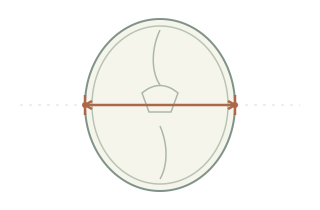
In the current version of BabySize, biparietal diameter is recorded and displayed but does not change the head shape on its own. So if you change only BPD and regenerate, the head outline may stay the same.
HC (head circumference): the distance around the head
HC · Head Circumference, the distance around the outer edge of the head, measured on a standard cross-section of the head.
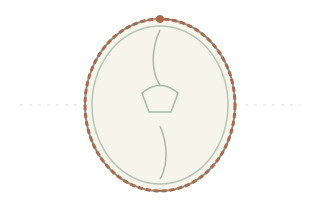
Biparietal diameter is a straight-line distance and head circumference is a distance around; one cannot replace the other. The tool keeps the head proportions of the reference image and adjusts overall size with head circumference; this cannot reproduce your baby's individual head shape.
FL (femur length): the length of the thigh bone shaft
FL · Femur Length, the length of the shaft of the femur (thigh bone), not the length of the whole leg.
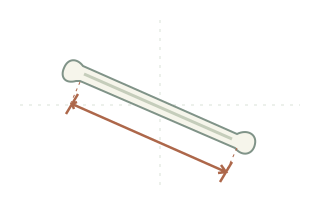
Don't read femur length as the distance from hip to toe. When entering values, use the FL item on your report rather than a measurement from another bone.
AC (abdominal circumference): the distance around the abdomen
AC · Abdominal Circumference, the distance around the outer edge of the abdomen, measured on a standard cross-section of the abdomen.
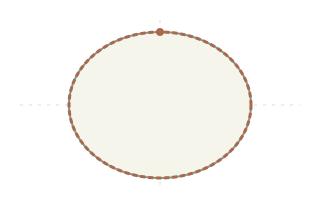
The diagram highlights only the outer edge of the abdomen and the distance around it; the internal pattern does not stand for any specific organ. Abdominal circumference is also not the same as the diameter of the belly or its width seen from the side.
Using the measurements in BabySize
Check the units on your report: this tool uses millimeters (mm) throughout. You currently need to fill in the gestational age and all four measurements; if any are missing, check your report first rather than guessing.
After you change the inputs, select “Create illustration” again to update the result. To check physical lengths on screen, see How to calibrate your screen with a physical ruler.
Sources and scope
The names and measurement locations above reference the ISUOG guidelines on fetal biometry and growth assessment and the guidelines for the routine mid-trimester fetal ultrasound scan (2022 update). The diagrams are drawn by BabySize to help you identify the items; they are not intended to guide ultrasound scanning.
The tool is for size illustration and keepsakes; it does not assess whether development is normal. Ask your prenatal care provider to explain your ultrasound results in the context of your care. You can learn more about how this site sources and maintains its content.